Showing posts with label video conference. Show all posts
Showing posts with label video conference. Show all posts
Friday, July 19, 2013
...It Just Got Real!
H.R 2643- it’s getting real ya’ll! :)
Not often do you find me discussing politics since it’s a very touchy subject, but in the news this week, there was an interesting article on Govermentvideo.com, discussing the importance of video conferencing and spending. http://www.governmentvideo.com/article/house-bill-seeks-to-increase-us-agencies%E2%80%99-use-of-video-conferencing/114593
The house bill “Stay in Place, cut the waste” has been introduced (H.R 2643) that is requesting the director of the OMB to review how much the federal agency has reduced travel expenses by the use of Video Conferencing as directed by the existing President and OMB orders and as required by the Federal Law. Furthermore, a bill already in place requires by fiscal year 2017, for Video Conferencing to achieve a 50% reduction in travel from year 2013.
What does this mean for you, our agents and of course your customers? Long distance communication is a critical factor for many modern organizations, which must efficiently connect with virtual teams and remote workers on a timely basis. Face-to-face meetings just don't make much sense, when employees or clients are located hundreds or thousands of miles away. When businesses need a cost-effective way to bring everyone together, video conferencing offers the perfect solution. By removing the need for travel, this modern way of doing business lowers overhead, while also increasing efficiency by offering quicker results. In short: video conferencing helps organizations save money. With our Mega Meeting and Vidyo products, you have two choices of video conferencing that can fit the need of your client. Need to video blast out to 200 people? Mega Meeting can accomplish this! Need to have HD video for medical demonstrations? Vidyo accomplishes that!
Call me today to discuss your opportunity and let’s get a demo out to your client!
- Caroline
the Conference Group
crogers@conferencegroup.com
877-716-8255 x 78253


Monday, April 1, 2013
The Anatomy of a Virtual Meeting

The Anatomy of a Virtual
Meeting
Like
the human body, a conference call will only function at top capacity when all
organs, limbs, and brain power are in sync. Whether you use client controlled features
or have our support professionals administer software operations, for smooth
running, every element of your webinar, audio, or video conference serves a
vital role.
The
speaker or person facilitating the virtual experience is essentially the
“brain” power, transferring information to the limbs and giving corporal
commands. The “head” is responsible for maintaining timing, creating decent
content, and interacting with the participants.
When you lead a
webinar, think beginning, middle, and end.
First
and foremost, know which of our features are applicable to your goal. Emphasize
from the beginning if you want feedback, encourage them to use certain
technology “lifelines” for communication throughout the meeting, and decide if
your ending will be open to Q&A time or maybe an invitation to email inquiries.
Attendees
may take advantage of our interactivity options; this is especially beneficial
when the group is large. Live voices, back and forth, can be impractical. When
this is the case, invite members to use technology solutions: email, live chat,
or IM. As for the one spearheading, use these aids to your benefit.
• Dedicated Operator
Prior
to the conference, figure out how many will be attending. This is important
because groups with more than 125 participants may require additional lines. When
setting up, dial in 5-10 minutes earlier using the Leader Code provided on the
back of your card and decide if your meeting should be recorded.
We
guarantee 24/7 assistance to ensure your virtual experience is optimum, but maintaining
transparency with your attendees by communicating our feature availabilities to
them will make for smooth anatomical function.
Friday, November 9, 2012
How do you Spread the Word?
I feel like I can’t get the word out loud enough or fast enough for everyone to hear…. With the recent disasters in the North East, Video Conferencing has played a large role in day to day business. (Of course, this pertains to those with power and internet service.) May I first say that you have all been on our minds at the Conference Group and we hope you and your families are safe.
During hurricane Sandy, I was luckily able to attend two video calls to assist an agent thanks to Video Conferencing. He was flying out the following day, and of course, was unable to get out of the airport. It has now become eminent to be able to communicate and share news, ideas, problems, emergency information and opportunities as they occur. In order to compete with challenging business environments and remain up to date on new product development, promotion, and projection opportunities, video collaboration is essential. Face to Face communication is becoming increasingly important in order to establish a rapport with client, customers, and co-workers. Video Conferencing is playing a vital role in serving and facilitating small to midsize and enterprise organizations with a tailored solution for real-time information transfer, knowledge sharing, trainings, and presentations.
The Conference Group Video Conferencing offers:
- Instant Face-to-Face video chat with voice and video
- Document Sharing through upload and online publishing
- Video demonstrations of software applications
- Screencast of desktop screen to a distant audience
- Collaborative editing and manipulation of shared content

I challenge all of TCG’s agents to take face-to-face online communication to a new level.
If I have not contacted you yet about a demo, I will be!! Look forward to SEEING you all soon! :)
- Caroline
Friday, October 5, 2012
The "New" Agent
I just got
back from Austin, TX and the CvxExpo / ITEXPO was great!! Realizing I am no “techie”, and I just
learned what BYOD means, I can say that it was an amazingly educational and fun
trip! With the convergence of IT and
telecom, its giving way to a new agent.
There comes a tie that our traditional agents need to understand how to
adapt and capitalize on this evolution, especially for the survival of their
business. This is where I fit in.
The show had
3 video conferencing sessions and I was lucky enough to be asked to join one of
the panels. On Thursday, October 4th,
I joined Charles Studt with Intelepeer and Scott Whatron with Vidtel to present
a session called “Bridging the Video Conferencing Chasm”.


A quick
excerpt “Companies looking to deploy and use video conferencing services often
are forced to muddle their way through platforms, disparate standards and an
assortment of devices and rooms systems”….. My first thought was “huh?’… But
then I started thinking, “why do we make this so hard?” We often wonder why our
agents aren’t selling video and I believe it’s because there is a perception of
the traditional video conferencing systems that were extremely expensive and
complicated. The video conferencing
services we offer eliminate the need for hardware, integrate with existing
video conferencing room systems, and are browser-based. In my world, Agents want to know 3 simple
things… Does it work? Is it user friendly/easy
to use? And Do I get paid on it? With
the Conference Group, the answer to these three questions is YES!!
So, why
haven’t you contacted the Conference Group about Video Conferencing? Starting next week, I will be holding
additional video conferencing sessions with all of you. Have your video camera ready and buckle-up;
it’s time to get excited and start selling it!
Contact Caroline Rogers at caroline.rogers@conferencegroup.com
877-716-8255 x78253 or Cell: 302-530-1666
Friday, June 1, 2012
7 Effective Video Conferencing Habits
How many of us have read “Seven Effective Habits of Highly Effective People”? I just re-read this classic over the weekend. I think this and “Who moved my Cheese” are my two favorite business books. While I felt more like Scurry this weekend from “Who moved my Cheese” due to my daughter’s prom, (you know… hair, nails, makeup…. pictures), I was also highly effective. End result – Prom weekend was fabulous! As I am doing all this, my mind replayed the week and all the great video conferences I had. Then, it dawned on me - how effective were these calls and what can I do to make them even more productive moving forward? So in keeping with this theme, I have decided to talk about the “Seven Effective Habits of a Video Conference”. So what are they?
1) LISTEN - A stereotypical “no-no” in sales is talking continually. Don't become so focused on your own needs that you don't listen to the client. It is our role to be an advocate for our clients. Don’t interrupt. Listen to them and their concerns. Watch for non-verbal cues, ask the effective questions and again….Listen. Video Conferencing is an effective tool that provides face to face meetings, without having the travel costs associated with it.
2) ATTIRE - My family often laughs at me because many times I am “business on the top, party on the bottom”, meaning I have on business attire from the waist up and sweat pants or shorts from the waist down. (Don’t you know your news anchors are doing the same?) Of course, this won’t work if I am doing a presentation standing up! But one thing that needs to be considered is color and patterns. In keeping with TV announcers, have you noticed how they all wear solid colors? There is a reason. Patterns don’t play out so well and can hurt your client’s eyes.
3) SILENCE - Meetings are typically held in Conference rooms or offices for a reason; privacy and quietness. Your video conference needs to be conducted in the same manor. Make sure TV’s are off, radios are off and that background noises are at a minimum. If you conduct a meeting in the office, politely ask that co-worker to keep the noise down.
4) PRACTICE - I can’t stress how important this is! Before I get on any video call, I always go over all presentations multiple times. Just as you would for an in-person meeting, correct? If you use gestures, make sure they can be seen on camera. Practice with your web cam. More importantly, make sure any Power Point presentations, etc. are uploaded ahead of time and ready to use.
5) BACKGROUND - Whether you are in an office space, a board room, a kitchen or a home office - ALWAYS know what’s behind you. Remove pictures from behind you if needed, make sure the lighting is soft and that you don’t have a direct light behind you aiming towards the web-cam. If possible, have your company logo behind you.
6) DISTRACTIONS - Having the advantage of working out of a home office can many times HAVE a huge disadvantage…Spouses, children, teens, animals, etc. Yes - this is my home office as I am sure it is for many of you. My family knows when I am on a call they are not to come into my office, interrupt me or dare step in front of the camera. On top of these distractions, we have email and smart phones. Make sure you turn off all ringers, tones and beeps. Do not read your email or answer a text. You would not do this (I hope) in front of a client, so please don’t do it on a video conference. Same can be said if you are in a physical office space or conference room. Make sure you turn off all distractions.
7) VIDEO CLIPS - I personally am not a fan of using them on video conferences, however in some instances, they are needed. If you must use them, do yourself and your client a favor by having them uploaded ahead of time. Video absorbs a lot of bandwidth and take minutes to upload, just make sure to have it done prior to starting your conference.
Video and web conferencing can be a powerful tool for sales professionals. It’s an amazing way to connect to your clients or potential clients and needs to be held in the same professional manner you would if conducting an on-site visit. With a little attention and preparation, you can be as successful and more profitable with video and web conferencing.
For more information or a demo, contact Caroline Rogers.
Caroline.Rogers@conferencegroup.com
877-716-8255 x78253
Friday, May 18, 2012
LotusLive® or MegaMeeting®? Part 2
Last week we went over the LotusLive® and some of its selling points, this week I am going to go over MegaMeeting.® MegaMeeting® is a browser based, multi-point video conferencing solution.
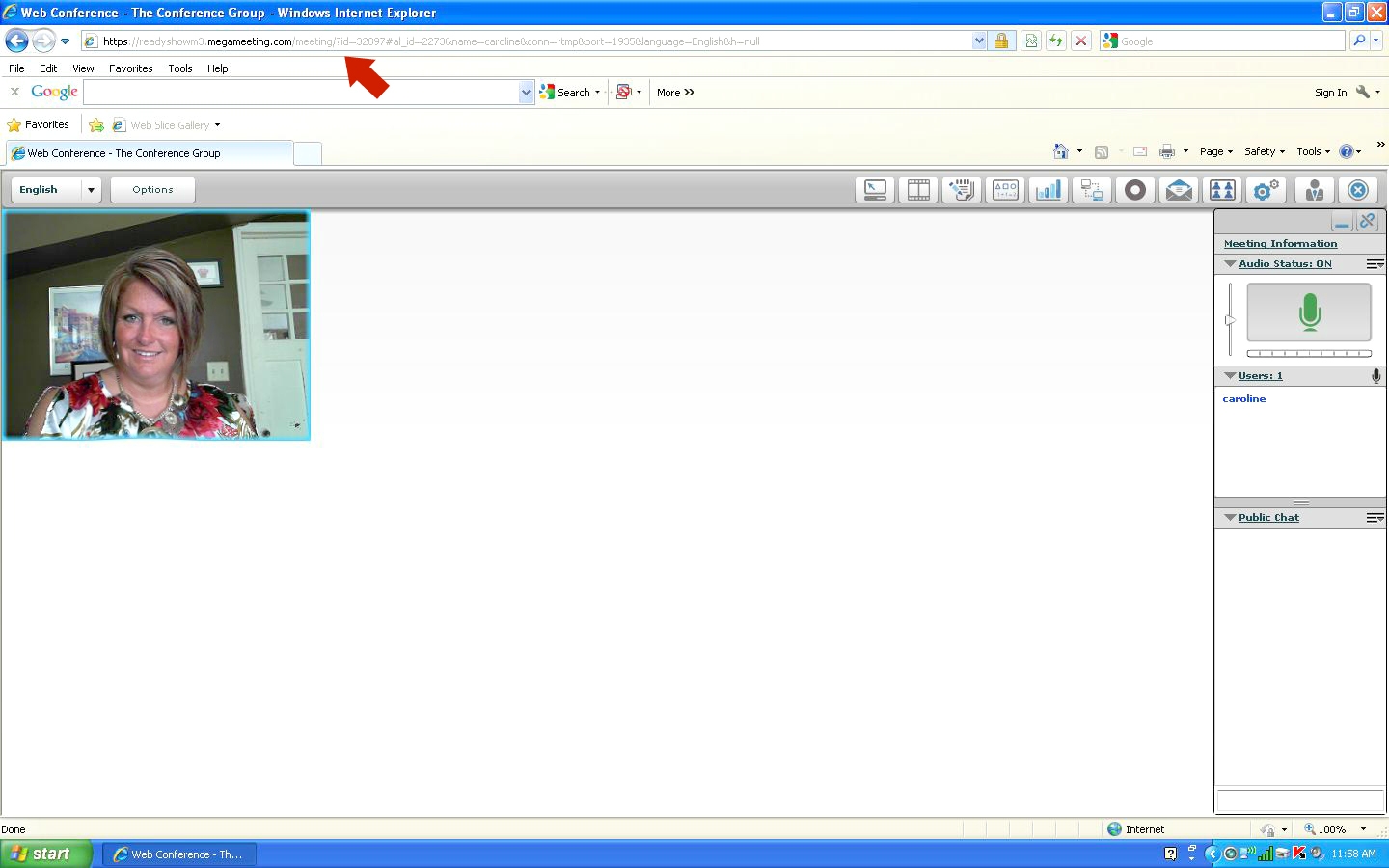

MegaMeeting® is very easy to use and all your tools are available in the tool tray.


Furthermore, according to Information Week from April 2012, studies are showing that 75% of Enterprise businesses will be using Video Conferencing by 2013… So, I have to ask… “What is your Agency doing”? You need to be selling Video Conferencing, more importantly The Conference Group’s MegaMeeting®. If you aren’t, I assure you someone else is! Contact me at caroline.rogers@conferencegroup.com or 877-716-8255 x78253 for a demo for yourself or for your potential clients.
Friday, March 16, 2012
What Are You Doing For Conferencing?
In my previous “life”, I never asked the client this one simple question, “What are you doing for conferencing”? It is something that we leave on the table 90% of the time and it’s something that I assure you one of your competitors is asking. As budgets grew tighter around 2009, 2010- many companies switched to audio conferencing. This kept the travel expenses down helping overall operating costs. Now, we have come to a point where Video Conferencing has become cost effective for medium and small size businesses.
Present day video conferencing is simply software that is a browser based and can be easily installed on the PC. After installing the software and getting connected to the internet, a user can participate in a video conference by using a username and password. The Conference Group has two options for you. MegaMeeting® is 100% browser based and cross platform; meaning it will work on MAC®, LINUX® and WINDOWS®. It is compatible with all major internet browsers. It allows for multi- languages so international and global meetings are easy. Our latest product is Vidyo®…. Vidyo is an HD based application that will take the distortions, delays and dropped calls off the agenda. Both products are equally superb and have different price points to help the customer’s budget. Don’t leave conferencing on the table in 2012; make it a part of your portfolio, a part of your sales pitch and a part of your revenue stream!
- Caroline T. Rogers
Follow us on Twitter @tcgchannel!
Subscribe to:
Posts (Atom)
