Friday, July 27, 2012

China 400 Toll-Free Numbers


Are you tired of having up to three phone numbers for China; one for North China (landline), South China (landline), and a separate one for mobile? Well, scheduling a conference call with China-based participants has never been easier! The Conference Group now offers China 400 numbers to connect all of your participants in China with one toll-free access number! Eliminate the hassle of determining the type of phone your participants use, as well as the area of China they call from and ask about our China 400 numbers today! Our Customer Service Team is available 24/7 to assist you.

Why China 400 Toll-free Numbers?

•ALL participants located in China use the same 400 number

•Includes ALL Provinces of Mainland China

•Works with ANY mobile or landline phone

•Available with ALL TCG audio conferencing solutions

Add your China 400 number to our Outlook Plug-in and send it with every conference invitation!

Friday, July 13, 2012

Recording: 101

Conference recordings are essential to most businesses today. Not only do they help you remember what was said in a meeting, but they allow for participants who were unable to join the meeting to listen to the conference on their own time. Here is a list of our “recording basics” to get you started.


Recording Audio Conferences:

1. Verify recording is available for the audio conferencing service you are using. http://www.conferencegroup.com/audio-conferencing/compare-all-audio

2. Remember…Conferences will NOT automatically record. You must initiate the recording through a star command as the leader. (Unless you are using our Event or Event Answered Services, an operator can perform this function for you if it is requested ahead of time.) Please see our User Guides for specific recording instructions. http://www.conferencegroup.com/support/user-guides

Notification:

Once you have started a recording in your audio conference, all existing and new callers will hear the message, “The conference is now being recorded.”

Accessing Recordings:

Depending on the type of audio conferencing service are you using, you may have to access your recording differently.

• Reservationless recordings can be accessed through our Customer Dashboard. http://www.conferencegroup.com/dashboard
• For more information on our Customer Dashboard, please see our Dashboard User Guide.  https://www.conferencegroup.com/support/user-guides/customer-dashboard.aspx
• Event/Event Answered/Scheduled conference recordings can be accessed through our Conference Recording Center. http://www.conferencegroup.com/cdr/conference


Note: For login credentials, please contact our Customer Support Department. support@conferencegroup.com

Emailing Recordings:

If requested prior to the start of your conference call, you may elect to have your conference recordings emailed to you. The following email options are available:

• In your Attendance Report

• In a Separate Email

Recording Availability:

• .mp3 Recordings are available for 30 days

• To retain your file longer than 30 days, please save your .mp3 recording to your computer.

• There is no limit to the number of .mp3 downloads. However, the link will expire 30 days from the date of the conference call.

Transcription:

The Conference Group also offers transcription services for your recorded conferences. So, should you decide after a call that you need it transcribed, contact our Customer Service Department and they will have it back to you in 48 hours! csr@conferencegroup.com

Don’t Forget! Recording your audio conference is FREE! Make sure to take advantage of this great tool on your next conference call.

Thursday, July 5, 2012

"Independence"


As Telecom Agents, Master Agents or Independent agents "independence" is something you all can relate to. Freedom of running your own schedule, setting your own pay and controlling your business, all the while enjoying our wonderful world of Telecom. (Crazy, right?)

I wanted to tell you all that the Conference Group greatly appreciates the opportunities you have entrusted to us and we thank you!!

During this next week, enjoy the time with family and friends and of course, please be safe!!

I hope you had a great Independence day and Wednesday! :)

Caroline

Monday, June 18, 2012

Group-e is Where it's APP!

TCG once again has an “app” for that! Introducing Group-e, our FREE mobile app that allows you to connect to a conference call with a single tap! Do you know the best part? It works on ALL Conference Call providers, not just TCG!

The Free mobile app is available on Apple, Android and Blackberry Smartphone’s. In this example I am using an IPhone. Simply launch the application:


Add your conference information here:


And of course “Save”… Then for your next call, simply launch the application and tap “Join a Conference”. – Then Bam!  You are on your call!


Group-e allows you to store all your conferencing information conveniently on your mobile device. It’s easy to host or participate in an audio conference call with a few taps of the screen.

To download Group-e or to learn more, go to www.conferencegroup.com/group-e

Watch our new Group-e video and see how Group-e is where it’s “APP”! http://www.youtube.com/watch?v=JYaytQ2pXBM

Plus, enter for your chance to win a $200 Amazon gift card! http://www.conferencegroup.com/group-e/gift-away

For more information you can also contact Caroline Rogers at caroline.rogers@conferencegroup.com or 877-716-8255 x78253

Friday, June 1, 2012

7 Effective Video Conferencing Habits


How many of us have read “Seven Effective Habits of Highly Effective People”? I just re-read this classic over the weekend. I think this and “Who moved my Cheese” are my two favorite business books. While I felt more like Scurry this weekend from “Who moved my Cheese” due to my daughter’s prom, (you know… hair, nails, makeup…. pictures), I was also highly effective. End result – Prom weekend was fabulous! As I am doing all this, my mind replayed the week and all the great video conferences I had. Then, it dawned on me - how effective were these calls and what can I do to make them even more productive moving forward? So in keeping with this theme, I have decided to talk about the “Seven Effective Habits of a Video Conference”. So what are they?

1) LISTEN - A stereotypical “no-no” in sales is talking continually. Don't become so focused on your own needs that you don't listen to the client. It is our role to be an advocate for our clients. Don’t interrupt. Listen to them and their concerns. Watch for non-verbal cues, ask the effective questions and again….Listen. Video Conferencing is an effective tool that provides face to face meetings, without having the travel costs associated with it.

2) ATTIRE - My family often laughs at me because many times I am “business on the top, party on the bottom”, meaning I have on business attire from the waist up and sweat pants or shorts from the waist down. (Don’t you know your news anchors are doing the same?) Of course, this won’t work if I am doing a presentation standing up! But one thing that needs to be considered is color and patterns. In keeping with TV announcers, have you noticed how they all wear solid colors? There is a reason. Patterns don’t play out so well and can hurt your client’s eyes.

3) SILENCE - Meetings are typically held in Conference rooms or offices for a reason; privacy and quietness. Your video conference needs to be conducted in the same manor. Make sure TV’s are off, radios are off and that background noises are at a minimum. If you conduct a meeting in the office, politely ask that co-worker to keep the noise down.

4) PRACTICE - I can’t stress how important this is! Before I get on any video call, I always go over all presentations multiple times. Just as you would for an in-person meeting, correct? If you use gestures, make sure they can be seen on camera. Practice with your web cam. More importantly, make sure any Power Point presentations, etc. are uploaded ahead of time and ready to use.

5) BACKGROUND - Whether you are in an office space, a board room, a kitchen or a home office - ALWAYS know what’s behind you. Remove pictures from behind you if needed, make sure the lighting is soft and that you don’t have a direct light behind you aiming towards the web-cam. If possible, have your company logo behind you.

6) DISTRACTIONS - Having the advantage of working out of a home office can many times HAVE a huge disadvantage…Spouses, children, teens, animals, etc. Yes - this is my home office as I am sure it is for many of you. My family knows when I am on a call they are not to come into my office, interrupt me or dare step in front of the camera. On top of these distractions, we have email and smart phones. Make sure you turn off all ringers, tones and beeps. Do not read your email or answer a text. You would not do this (I hope) in front of a client, so please don’t do it on a video conference. Same can be said if you are in a physical office space or conference room. Make sure you turn off all distractions.

7) VIDEO CLIPS - I personally am not a fan of using them on video conferences, however in some instances, they are needed. If you must use them, do yourself and your client a favor by having them uploaded ahead of time. Video absorbs a lot of bandwidth and take minutes to upload, just make sure to have it done prior to starting your conference.

Video and web conferencing can be a powerful tool for sales professionals. It’s an amazing way to connect to your clients or potential clients and needs to be held in the same professional manner you would if conducting an on-site visit. With a little attention and preparation, you can be as successful and more profitable with video and web conferencing.

For more information or a demo, contact Caroline Rogers.

Caroline.Rogers@conferencegroup.com
877-716-8255 x78253

Friday, May 18, 2012

LotusLive® or MegaMeeting®? Part 2

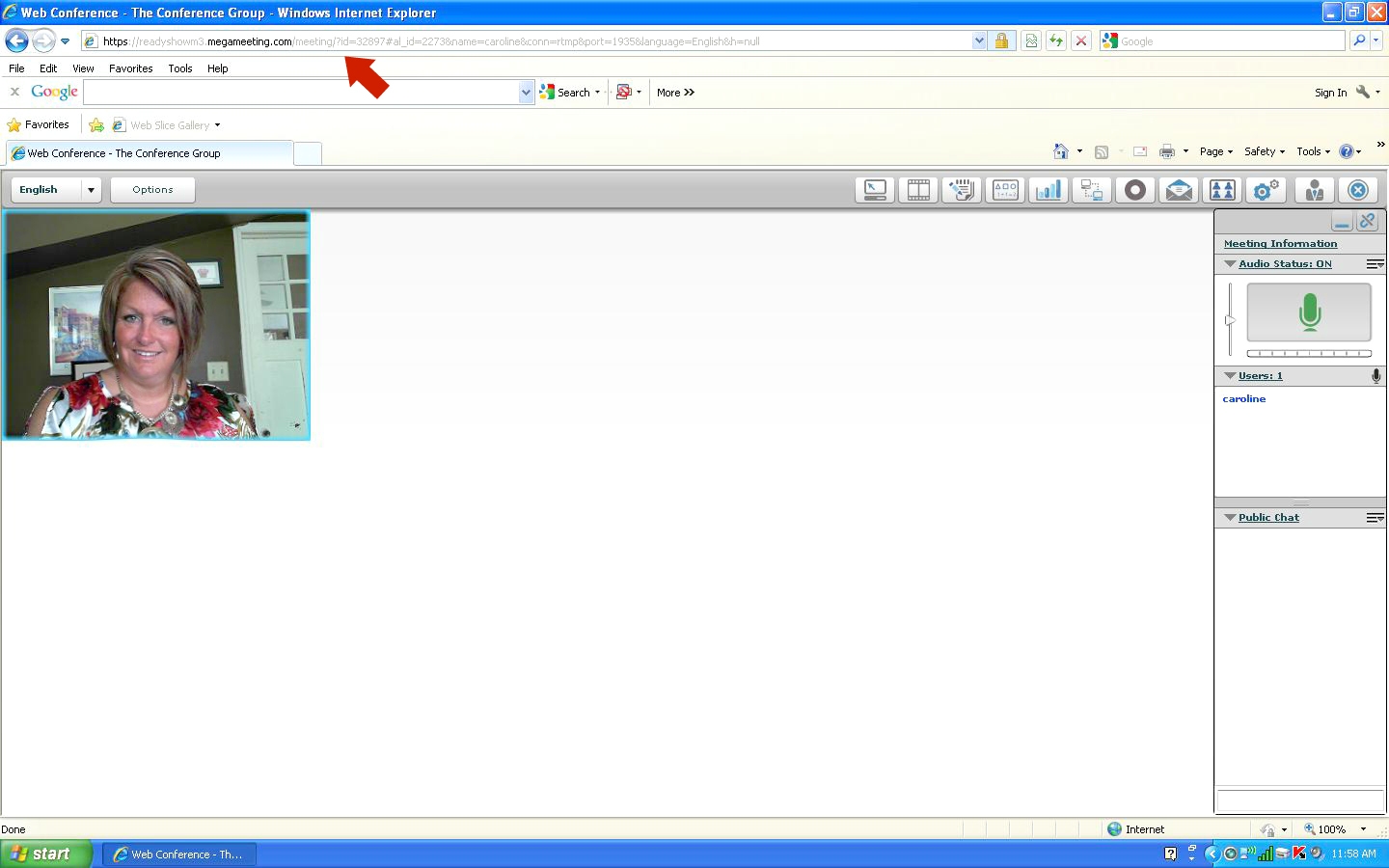
Last week we went over the LotusLive® and some of its selling points, this week I am going to go over MegaMeeting.®  MegaMeeting® is a browser based, multi-point video conferencing solution.
MegaMeeting® requires no downloading, installing or configuring of software.  MegaMeeting® is compatible with all major operating systems.  With this product, you can have up to 16 cameras displayed at the same time. For this example, Here are two cameras visible.
MegaMeeting® is very easy to use and all your tools are available in the tool tray.
Via VoIP or another one of our audio conferencing solutions, your conference participants are able to talk to each other by using a standard telephone or a headset/microphone. 
Consider what happens if each of these 16 cameras were positioned at the head of a table in your office with employees/staff seated along the length of the table. Instantly multi-point video becomes a solution for your staff, worldwide without the expense of travel. Video conferencing usage is predicted to rise in the small and medium business sector due to rising cost of travel. Small and medium-sized businesses are becoming more and more interested in moving from free or very low cost video conferencing systems such as Skype towards telepresence technologies similar to those formerly aimed exclusively at enterprise-level operations. MegaMeeting® fits!!

Furthermore, according to Information Week from April 2012, studies are showing that 75% of Enterprise businesses will be using Video Conferencing by 2013… So, I have to ask… “What is your Agency doing”? You need to be selling Video Conferencing, more importantly The Conference Group’s MegaMeeting®. If you aren’t, I assure you someone else is! Contact me at caroline.rogers@conferencegroup.com or 877-716-8255 x78253 for a demo for yourself or for your potential clients.

Friday, May 4, 2012

LotusLive® or MegaMeeting®? Part 1


One of the questions I am receiving more and more today is “what is the difference between LotusLive® and MegaMeeting®?” This week, I thought it would be a good idea to go over LotusLive®’s web conferencing. The cool thing about LotusLive® and our audio platform is that you don’t have to remember any separate codes. Your audio conference Leader Code “is” your LotusLive® Leader Code. So what does LotusLive® look like?


As the host, you will sign in using your Leader Code and Participant Code. LotusLive® provides you an attendance summary report via email. In order to get this, simply provide your email information when initiating a web conference:


LotusLive® is an easy web product to navigate through. Some of the features are: upload and publish PowerPoint presentations, Word documents and Excel spreadsheets. You can also conduct polls, annotate the presentation and highlight key points. LotusLive® comes with a recording feature which enables your clients to record a presentation and sync it with our audio conferencing. They can then send it out via email OR publish the link to their website for clients to review in the future.

Here are a couple of screen shots on the above features:


The best way to learn about LotusLive® is to demo it. As mentioned in my March 2nd blog, all agents who are producing receive a $50.00 credit off their bill. This credit can be used for LotusLive® demos! Give me a call to see how you can earn this credit, or better yet give me a call telling me you have a client who needs a web conferencing product and I will demo it for you!  Stay tuned for Part 2 of my LotusLive® or MegaMeeting® blog and you decide!  Which one will you choose??... May the 4th be with you!  :)

Contact Caroline Rogers @ caroline.rogers@conferencegroup.com or 877-716-8255 x78253 for a demo for yourself or for your potential clients.